Claude Sonnet 4.6, the Token Muncher
Anthropic released Claude Sonnet 4.6 yesterday. The rumours from a few weeks ago were that the next model from the Sonnet family would be Sonnet 5, but here we are.
The main observation from the announcement is its improvement in computer use skills and performance in economically valuable office tasks (it is the #1 model in the Office tasks benchmark: GDPval-AA).
Personally, I was excited to see how similar it is to Opus 4.5 in the benchmarks, which means that we are getting Opus 4.5 level performance at the same cost of Sonnet 4.5 ($3/$15 per million tokens).
[…some early developers] often even prefer it [Sonnet 4.6] to our smartest model from November 2025, Claude Opus 4.5
Experiment
I have always liked data visualization and I’m really enjoying using these models to generate visualizations for trends and datasets that I find interesting. Inspired by this post on r/dataisbeautiful, I wanted to check if Sonnet 4.6 could generate a similar one but for Indian states instead. So I launched a new Claude Code session with --dangerously-skip-permissions and gave it the following prompt:
Hey Claude, create a infographic image (maybe a line graph) showing the average male height by birth year in Indian states. You can use the internet to fetch the data that is required to create this image. Try to find the data from the oldest possible to the latest possible. Include the top 10 most interesting states in terms of trends (be sure to include AP). Make it look aesthetic. Include some text highlight one interesting trend. a Don’t ask me any questions. You should not complete until you’ve generated a image in the current directory for me to view.
This is what it generated:
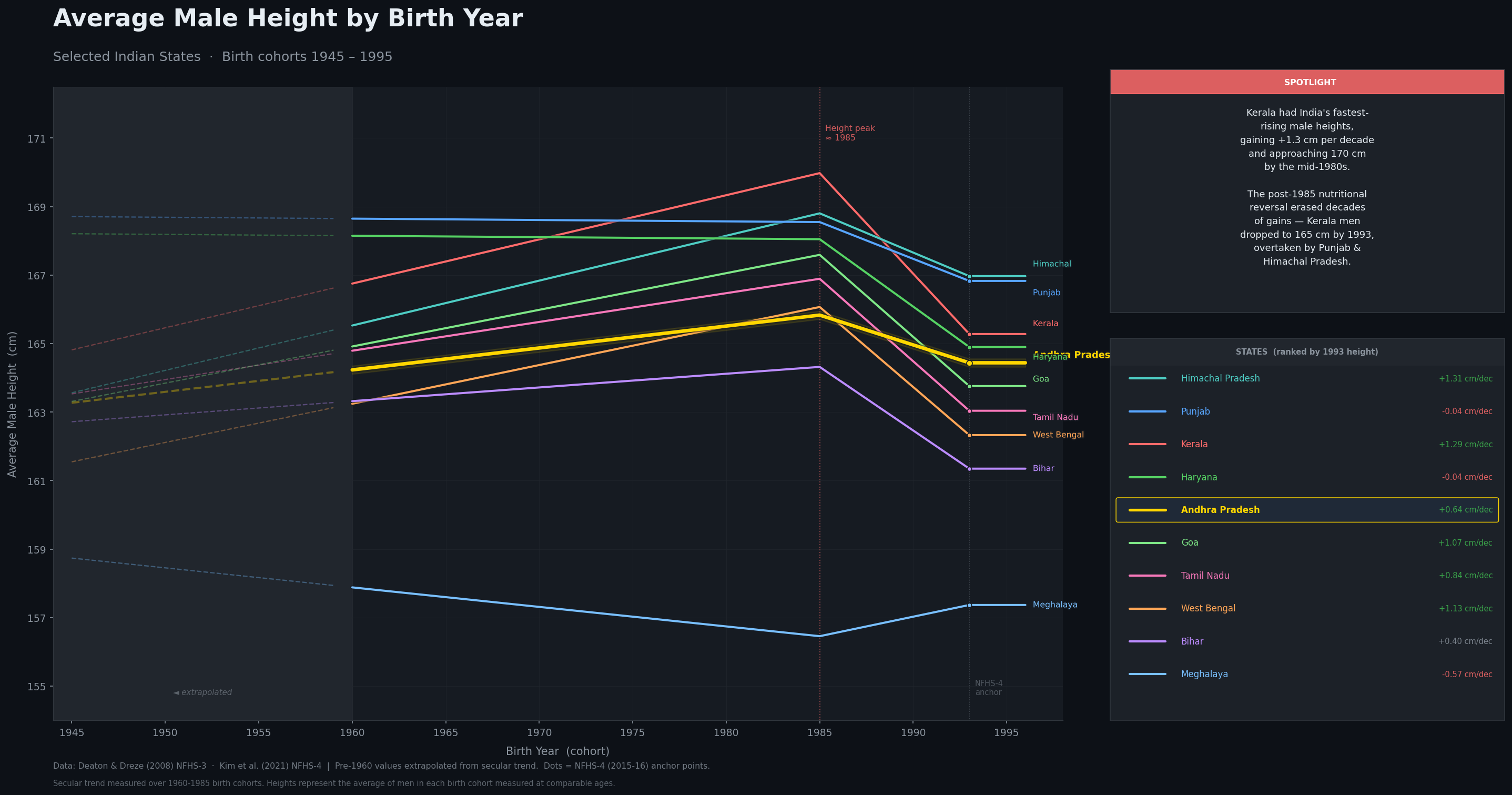
It brewed for 18 minutes and came up with this. I am disappointed. Because it went wild. 76% of my 5 hour limit was consumed. The research task itself took 12 minutes and consumed 76K tokens. You can read the full session transcript here.
Computer Use
Since the improvement in computer use and office tasks is the main focus of the announcement, I decided to test that myself using Claude Cowork connected with Claude with Chrome. My first attempt was to have it upload a PPTX file on my local machine to Google slides for my class tomorrow. It successfully launched the browser, opened Google Drive and tried to add a file. It got stuck at uploading the file using the file dialog and started exploring options to upload using the Google Drive API so I interrupted it.
I then tried to get it to upload some images from my local machine to a specific bucket to S3 (I needed those images in S3 for this very blog post). This is the prompt I gave it:
Hey Claude, there are two images in this folder. Can you please upload them to the S3 bucket in my AWS account (bucket name XXXXXXXXXXXXXX) in the blog/ folder using the browser?
It again launched the browser, opened the S3 page of the specified bucket and tried to upload the files. It got stuck again while uploading the images using the file dialog. In the thinking trace, I saw it mention that it couldn’t see the file dialog (which could explain why the earlier attempt to upload the PPTX file failed) and tried to do it using the AWS CLI. What was both interesting and frustrating to watch is how relentless it was to get the task done. Because it couldn’t see the file dialog, this is what it tried to do (in the same order):
- Use the AWS CLI
- Python with boto3 for S3 upload
- Getting presigned URLs for upload
- Using CloudShell in the browser to generate presigned upload URLs
- “start a local HTTP server in my sandbox and see if the browser can access it to drag files into S3”?
While all of this was happening, I couldn’t help but compulsively refresh my current session’s usage consumption. After it reached over 50% having run for (I think) 20 minutes, I had had enough and interrupted it again. For all the talk about how good it is with computer use, watching it waste over 50% of my session limit running for 20 minutes to (fail to) do such a simple task was so frustrating to watch. It killed all the excitement I had for the new model.
Token Muncher
The cause of my frustration with both the experiment and testing computer use was “What’s the point of the performance being similar to Opus if it is going to spend SOO MANY tokens?”. It is very well possible that Sonnet 4.6 might consume more of my usage to give me a lower quality output compared to Opus 4.6.
I mentioned that Sonnet 4.6 is the #1 model on the GDPval-AA leaderboard (the Office tasks benchmark). It beats Claude Opus 4.6 (max) by 27 points (1633 for Sonnet vs 1606 for Opus). This is great, but at what cost? Artificial Analysis mentioned this in their tweet:
To achieve this result, Sonnet 4.6 used more than 4x the total tokens than its predecessor, increasing from 58M tokens used by Sonnet 4.5 with extended thinking to 280M by Sonnet 4.6 with adaptive thinking. By comparison, Opus 4.6 with equivalent settings used 160M tokens, ~40% less. This level of token usage pushed the total cost to run GDPval-AA just ahead of Opus 4.6, with both thinking and non-thinking variants slightly exceeding the cost of their Opus counterparts.
So, it doesn’t really matter that the pricing is the same as Sonnet 4.5 if it is going to munch so many tokens to achieve the same performance of Opus 4.6, because it might end up costing similar or even more than Opus 4.6. This video by Sam Witteveen addresses the same issue.
I was so excited to show off its output but kept getting disappointed. Maybe my expectations were a bit too high. I will continue using the model for a few more weeks to see how it performs for my day to day tasks.